Getting Started#
Prept is a CLI tool for managing boilerplates and reusing them to bootstrap complex projects with a single command.
This tutorial focuses on installing Prept, setting up a basic boilerplate, and finally bootstrapping a project from it.
Installation#
Prept can be installed through pip or another Python package manager:
$ python -m pip install prept
Note that Python 3.9 or a higher version is required for installing Prept.
Jinja Templates#
If you intend to use Jinja templates in your boilerplates, you will be requiring Jinja2 to be installed as well.
You can either install it directly or install Prept along with Jinja2 in a single command:
$ python -m pip install prept[jinja]
Usage#
Prept operates on boilerplates which are simply directories containing source code files that can be reused.
Initializing Boilerplate#
To show this, below is an example Python web app template in a directory named
web-app-template:
web-app-template
│
├── routers
│   ├── users.py
│   ├── messages.py
│   └── groups.py
│
├── utils.py
└── main.py
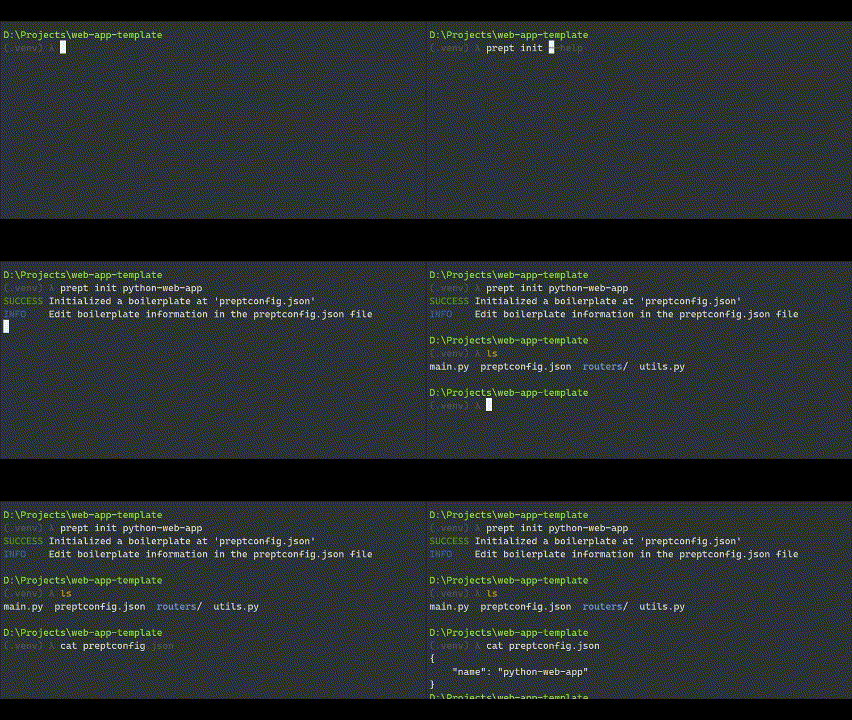
We can initialize this directory as a Prept boilerplate by running the prept init command in this directory:
$ prept init python-web-app
python-web-app is the name of boilerplate that will be used to refer to it when
generating a project from this boilerplate.
This command creates a boilerplate configuration file preptconfig.json:
web-app-template
│
├── routers
│   ├── users.py
│   ├── messages.py
│   └── groups.py
│
├── preptconfig.json
├── utils.py
└── main.py
Generating Project#
We can now use prept new command supplying this directory’s path as argument along with output directory to bootstrap a project from this boilerplate.
The following command is ran in directory where web-app-template directory is
present:
$ prept new .\web-app-template -O my-web-app
my-web-app is the name of output directory where project files are created.

Installing Boilerplate#
Repeatedly using paths such as .\web-app-template is not practical in most cases. Ideally, you
would want to have a way of generating project from this boilerplate by simply referring to its
name.
This can be achieved by globally installing the boilerplate through prept install command. This command takes the boilerplate path as argument which is to be installed.
The following command is ran in web-app-template boilerplate directory:
$ prept install .
. indicates that boilerplate is located in current working directory.
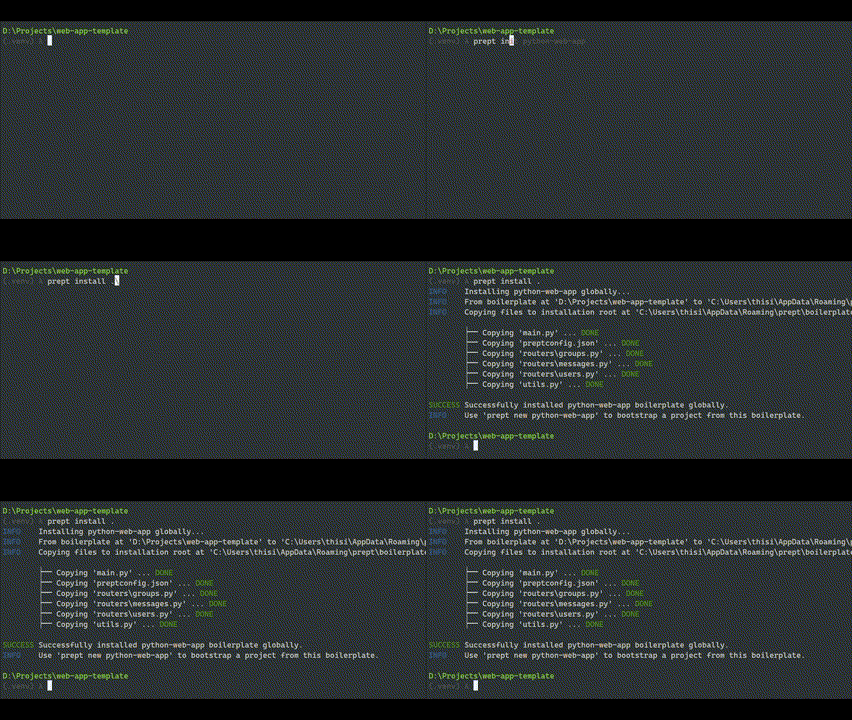
We can now use prept new python-web-app command anywhere to quickly generate project from this boilerplate!

Tip
You can use prept uninstall to uninstall a boilerplate and prept list to see the list of installed boilerplates.
Template Files#
The following is the content of main.py:
import flask

app = flask.Flask(__name__)

@app.route('GET', '/')
def index():
    return {'message': 'Welcome to $APP_NAME'}

if __name__ == '__main__':
    app.run(debug=True)
Here, we are expecting that $APP_NAME can be replaced with a value that
user can provide at the time of project generation.
This can be achieved through what Prept calls “templates.”
main.pyis called the template file.APP_NAMEis called the template variable.
Template files are processed by a middleware called template provider that processes the file content and injects the variable values into it. Each template provider has its own template rules and syntax.
In this case, we are using stringsub template provider which provide variable
substitutions using the dollar sign ($) syntax as we used in main.py content above.
Note
In complex applications, Jinja templates are used which are more powerful and
flexible. They are provided by the jinja2 provider.
We define template provider, files, and variables in preptconfig.json. Here is the updated configuration:
{
    "name": "python-web-app",
    "template_provider": "stringsub",
    "template_files": ["main.py"],
    "template_variables": {
        "APP_NAME": {
            "summary": "The name of application.",
            "required": false,
            "default": "Simple Web Application"
        }
    }
}
Tip
template_files is an array of gitignore-like path patterns which means
you can provide a name of directory and all files under this directory will
be defined as template files.
This also allows passing "*"" which defines all files in boilerplate
as template. However, this practice is not recommended.
Note
As we have updated the boilerplate, we must install it again through prept install command if it was previously installed to reflect the changes in global installation.
We can now run prept new command and provide the value for APP_NAME variable
for it to be injected into main.py.
$ prept new python-web-app -O my-app
INFO    Generating project from boilerplate: python-web-app
INFO    No existing directory found. Creating project directory at 'D:\Projects\my-app'
INFO    Successfully created project directory at D:\Projects\my-app
INFO    Processing template variables
OPTION  The name of application.

        APP_NAME (optional) [Simple Web Application]: Chat Application

INFO    Creating project files at 'D:\Projects\my-app'

    ├── Creating my-app\main.py ... DONE
    ├── Applying template on my-app\main.py ... DONE
    ├── Creating my-app\routers\groups.py ... DONE
    ├── Creating my-app\routers\messages.py ... DONE
    ├── Creating my-app\routers\users.py ... DONE
    ├── Creating my-app\utils.py ... DONE

SUCCESS Successfully generated project from 'python-web-app' boilerplate at 'D:\Projects\my-app'

The generated main.py in project output directory has the following content:
import flask

app = flask.Flask(__name__)

@app.route('GET', '/')
def index():
    return {'message': 'Welcome to Chat Application'}

if __name__ == '__main__':
    app.run(debug=True)
As you can see, $APP_NAME was replaced with Chat Application.
Next Steps#
Prept comes with an array of useful features and customization capabilities. Listing them all here is not possible.
Take a look at our User Guide section that contains pages covering the features of Prept and various other details.